Vibe coding to production: the eight-step checklist
Vibe coding to production, step by step: auth, secrets, database, payments, hosting, monitoring, legal, analytics, and the operations that never end.
Taking a vibe-coded app to production means closing eight gaps the preview never showed you: auth, secrets, database, payments, hosting, monitoring, legal, and analytics. Then it means operating the result, which never finishes. This guide is the map.
Your app works. The preview looks great, your friends clicked around, nothing exploded. Now you want strangers to use it, and ideally pay for it. Here is everything between here and there, in order.
None of this is hard the way inventing your product was hard. It's hard the way moving apartments is hard: a hundred known chores, each one boring, each one able to ruin your week if skipped. AI builders solved the fun part. This is the other part.
Work through it top to bottom. Skipping ahead is how apps end up on the front page of Reddit for the wrong reason.
1. Auth: the preview's sign-in is not sign-in
Generated apps frequently ship with authentication theater: a login form whose state lives in localStorage, admin checks that run in the browser, or a Supabase project with row-level security disabled because that made the demo work.
The rule: every permission check must run on the server. The browser is enemy territory. Anything the frontend decides, a user with DevTools open can un-decide.
The auth checklist:
- Sessions issued and verified server-side (a real provider: Clerk, Auth0, Supabase Auth with RLS on)
- Row-level security enabled on every table with user data
- Admin routes verified on the server, not hidden in the UI
- Password reset and email verification actually tested
2. Secrets: your API keys are probably public
Search your repo for sk_live, sk_test, and every key you pasted while prompting. Generated code loves hardcoding credentials, and if the repo went to GitHub, so did they. Move everything to environment variables, rotate any key that was ever committed (rotating is free; assuming nobody saw it is not), and make sure client-side code only ever receives publishable keys.
3. Database: the demo data store won't survive contact
A file-backed demo database or a free-tier database seeded by hand is fine until the moment it isn't. Production needs a managed Postgres with automated backups, and here's the part everyone skips: restore a backup once, on purpose. An untested backup is a hope, not a plan. While you're in there, add the indexes your top three queries need; generated schemas rarely include any.
4. Payments: webhooks or it didn't happen
If your app charges money, the flow that matters isn't checkout; it's everything after. Subscriptions renew, cards decline, users upgrade mid-cycle, refunds land. All of that arrives as webhooks, and a vibe-coded Stripe integration that only handles the happy checkout path will drift out of sync with reality within the month.
Verify webhook signatures, handle retries idempotently, and gate features server-side off your database's subscription state, never off "the checkout page was visited." We wrote a full walkthrough in how to monetize a vibe-coded app.
5. Hosting: a URL with rollback, not a laptop with uptime
Minimum bar for taking money: your own domain with HTTPS, deploys that are reproducible (push to deploy, not FTP archaeology), and a way to get back to the previous version in one step when a deploy goes wrong. It will go wrong. Rollback turns "the site is down" from a crisis into an annoyance.
Builder-hosted deploys (Lovable, Replit) cover the first two. Check what they give you on the third, and know your exit: you'll want infrastructure you control before your customers get expensive. That move is covered in what to do after Lovable.
6. Errors and monitoring: someone has to hear it break
Right now, your monitoring is you, refreshing the tab. In production, errors need to go somewhere (Sentry or equivalent), something needs to check that the site is up every minute, and a human needs to get paged when it isn't. Set an uptime check on your two or three money paths: can a user load the app, sign in, and pay. A homepage that's up while checkout is down is the worst kind of up.
7. The legal folder
Privacy policy, terms of service, and a data-deletion story. Unglamorous, increasingly non-optional (Stripe, app stores, and EU users all ask). A generated draft reviewed once by a human beats nothing; nothing is what most vibe-coded apps ship with.
8. Analytics: know if anyone came
One product analytics tool (PostHog is a fine default), events on sign-up and payment, and a weekly look at the funnel. Skip the vanity dashboard. You need exactly three numbers at this stage: did people come, did they activate, did they pay.
The part nobody puts in the checklist
Here's the uncomfortable bit. Everything above is a project you can finish. Convex's guide to the same gap counts six steps; ours counts eight; either way it is a bounded list. But production isn't a state you reach. It's a job that starts.
Dependencies need patching. Certificates renew until one doesn't. The database fills up. A deploy on a Tuesday breaks webhooks on a Thursday. Marketing has to keep happening or the top of the funnel silently dies. This recurring layer is the actual reason "just ship it" advice undersells the distance: shipping is a day, operating is forever.
You have three honest options:
- Do it yourself. Free, educational, and a permanent tax on the hours you'd rather spend on product.
- A boilerplate plus discipline. Buys you the setup, leaves you the operating.
- A platform that runs it. The scaffold and the operations, owned by software, with you approving the big calls.
What the operating half looks like
ListMyCar.ai is a business we run this way. Its commits move through checks, staging, migrations, production, and smoke tests, and Solo records exactly which commit is live. When something fails, an incident opens with the release context and the failed logs attached, a fix has to pass the same checks as any other change, and the failed deploy stays in the record next to the one that worked.
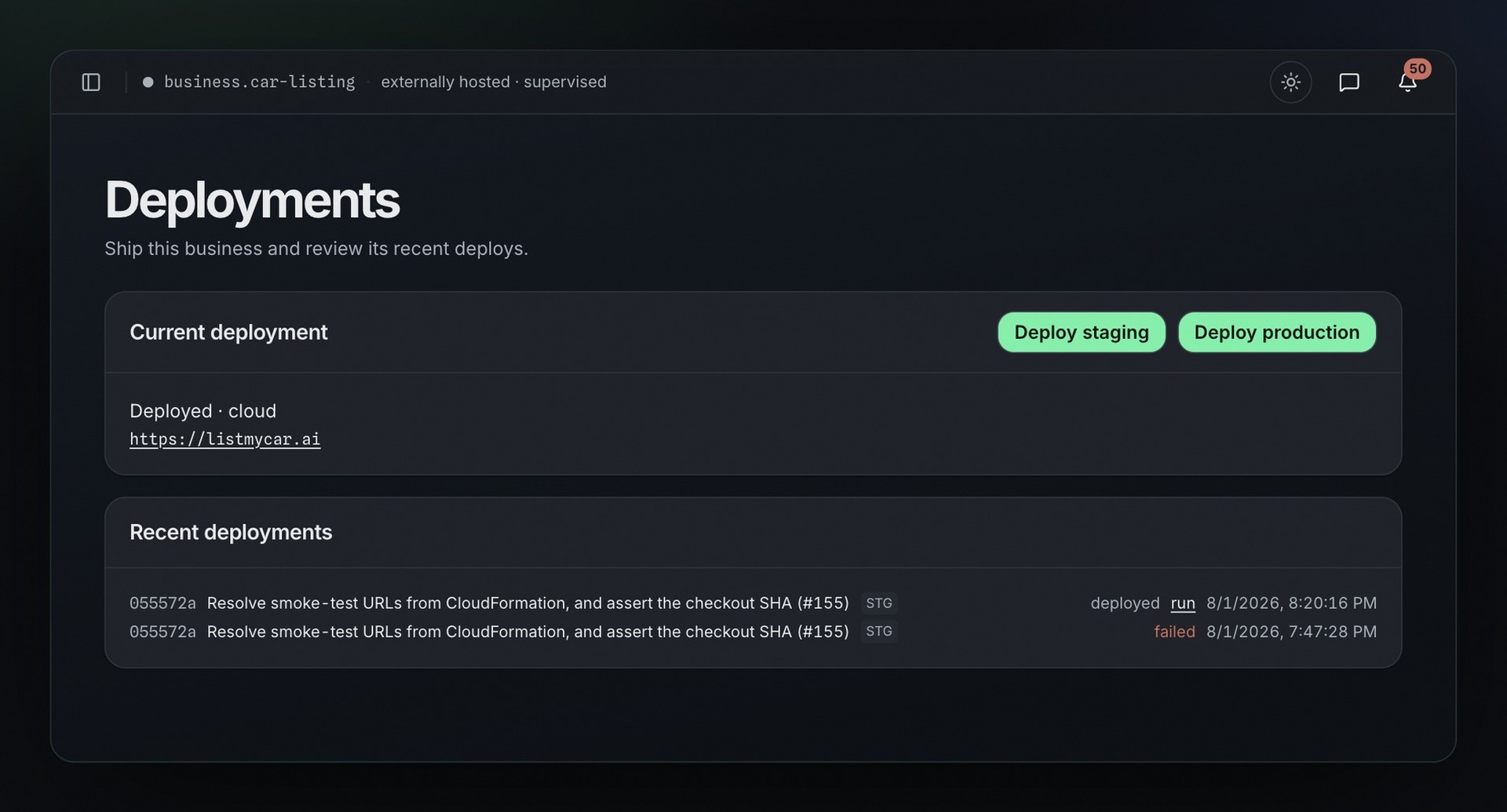 A failed attempt remains visible beside the successful deployment, preserving the operating record instead of replacing it with the final green state.
None of that is exotic. It is the checklist above, kept in place by software rather than by memory. The production readiness checklist is the general version for any SaaS, and the case study shows the loops with their numbers.
Solo starts you past this list. Auth, billing webhooks, managed Postgres, AWS deploys with rollback, monitoring, and marketing, wired on day one and then kept running, with your approval on what matters. You build the product with your own tools; the repo is yours. Join the waitlist →